---
updatedAt: 2026-06-23T15:38:07.000Z
agentTools:
projectIndex: https://docs.truelayer.com/llms.txt
---
# Automatically refund payments from external sources
Learn how to set up automatic refunds, reducing the need for manual refunds and reconciliation.
By default, you receive the `external_payment_received` webhook when you receive a payment from an external source instead of through TrueLayer's APIs.
You can choose to change the behaviour of this webhook. The default behaviour as of January 2024 is that you receive the webhook for an initial payment from an external account, but do not receive an automatic refund.
However, you may want to contact us to enable automatic refunds. This feature can be useful to:
* Reduce your exposure to payments from unverified payment sources.
* Decrease the amount of manual reconciliation required to refund incorrect payments.
* Ensure that pay-ins to your merchant account are closed-loop, so you can refund and pay them back more easily.
## When you might receive payments from an external source
When you receive an external payment, you get the `external_payment_received` webhook by default. This is typically in one of two scenarios.
### External deposits
An external deposit is when a payment enters your merchant account through a method other than a TrueLayer API. This can include:
* Top-up payments made to the merchant account from an IBAN you have whitelisted.
* Payments made directly to your merchant account's sort code and account number or IBAN.
A common example of this would be if a user paid you via a **Send again** function in their banking app, or by bank transfer.
### Returns
You receive a return in the following two scenarios:
* When you send an open-loop payout and it is blocked or rejected.
* If you have automatic refunds enabled, but the external deposit cannot be automatically refunded and is returned instead.
If you have this feature enabled and you receive an outbound payment return:
* The status of the payout is `failed`, with a failure reason of `returned`. This appears in Console as well.
* You receive a `payout_failed` webhook, with a failure reason of `returned`.
* In all resource related v3 endpoints (for example, GET `/v3/payouts/payout_id`) the payout has the `failed` status.
* In Console and the transactions endpoint, you see two transactions:
* the outbound transaction with the `executed` status, linking to the return inbound transaction
* the inbound transaction with the `settled` status, linking to the outbound transaction that returned
## How to enable automatic refunds
In order to enable automatic refunds, you need to contact us and request this feature. When you contact us, you should provide the following information:
* The `client_id` of any merchant accounts to enable automatic refunds for, and whether to enable them for GBP, EUR, or both.
* The IBAN for any external payment sources you want to whitelist, so that external payments from them aren't refunded automatically.
Typically, you would do this for any accounts you own and use to top up your merchant account.
> ❗️ Disable any related internal processes before enabling this
>
> You may already have automatic or manual processes to screen and handle external deposits. If this is the case, ensure you disable them *before* you enable automatic refunds. If you don't do this, you may issue multiple refunds for a single payment and lose money.
## Default behaviour without automatic refunds
In order to understand how automatic refunds work, you should first understand the default external deposit behaviour.

By default, when a payment from an external source settles in your merchant account, you receive the `external_payment_received` webhook. At the same time, the payment is added to the payments view in Console, with a **Type** of **External Deposit**.
Generally, you would then want to screen the payment to confirm it was expected.
## Behaviour with automatic refunds enabled
When you contact us and enable automatic refunds, any payments from an external source are sent back as an open-loop payout after 1 hour. This means that the number of payment events increases, but less action and reconciliation is needed from you.
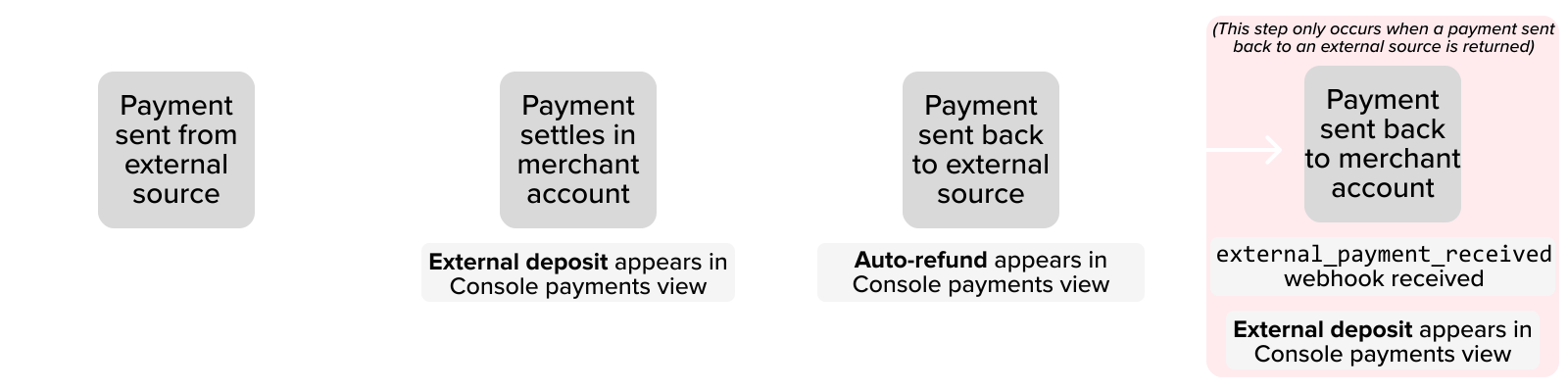
The typical flow of an automatically refunded external deposit is:
1. A payment is sent from an external source and settles in your merchant account.
The first payment shows as an **External Deposit** in Console, and you receive no webhook.
2. After 1 hour, the payment is refunded back to the external source.
The second payment shows as an **Auto-refund** in console, and you receive no webhook.
In some rare cases, it's not possible to refund the payment. Generally, this only applies to payments made over the CHAPS payment system or if the account is blocked or closed.
If it's not possible to refund the payment, there's a third step to the flow:
3. The refunded payment is sent back to the merchant account and settles.
The third payment shows as an **External Deposit** in Console, and you also receive the `external_payment_received` webhook.
We recommend that you contact the end user in this case to confirm the payment is correct.
### How an automatic refund displays in Console
When you have automatic refunds enabled, you don't receive any webhooks for external deposits that are refunded. The exception to this is if a payment cannot be refunded (for example, if the remitter account is blocked), where you receive a webhook.
This means that you can see external deposits in Console only. In the Payments table, you can filter by payment type or use the search bar to search for specific payments including external deposits. When you receive an external deposit, there are two entries in the payments view:
1. The inbound payment, which has a **Type** of **External Deposit**.
2. The outbound refund, which has a **Type** of **Auto-refund**.
This screenshot contains an example of an external deposit that has been automatically refunded. Note how the **Details** section in the right panel contains an **Auto-Refund ID** you can use to find the associated refund. The **IBAN** in the **Remitter** section also matches the **IBAN** in the **Beneficiary** section of the auto-refund.
This screenshot contains an example the auto-refund linked to the prior external deposit. Note how the **Details** section in the right panel contains a **External Deposit Transaction ID** you can use to find the external deposit that was refunded. Again, you can also use the **IBAN** in the **Beneficary** and **Remitter** sections.