
Enable your users to connect their bank account
Access bank account information including account holder name, balances and transaction history.
Data API v3 is the latest version of the Data productIntegrating with TrueLayer Data for the first time? Start here.
Data API v3 enables you to create a connection with your users' bank account. A connection enables you to access your user's bank account information, such as account holder name or recent transactions. To determine what types of information you receive, you can set scopes when you create the connection.
A connection represents a user's authorised link to their bank. After you make an initial authenticated API call, your user can then move through the authorisation journey to confirm their consent to the connection.
Once a connection is authorised, you receive a Connection ID associated with that specific connection which you can use to make other Data requests (for example, to request a user's transaction history).
You can access the following kinds of information:
- Accounts: account holder name, account number, sort code, IBAN etc.
- Transactions: description, amount, category, merchant name etc.
- User info: name on file at the bank.
You can then use that information for the following purposes (for example):
- Affordability checks for credit
- Affordability checks for gambling
- Onboarding users
- Rewards, such as cashback
Supported countries
Currently, Data V3 is only supported in the UK.
Authentication
Access token
For any Data V3 API call, you need a Bearer access token. You can get one by making a POST request to https://auth.truelayer.com/connect/token using grant_type=client_credentials and the data scope.
Connection-Id
In the headers of most Data v3 requests, you will also need to pass a Connection-Id. This represents your permission to access your user's bank account information.
Create a connection to receive a connection ID using the /data-connections endpoint.
Your connection ID must include the correct scopes for your use case to retrieve the information you want.
The scopes that you can include are:
infoaccountstransactions
Below are common use cases and the scopes you will need for them:
| Use case | Scopes you need |
|---|---|
| Rewards | accountstransactions |
| Affordability | infotransactionsaccounts |
| Onboarding | infotransactionsaccounts |
| Account verification | infoaccounts |
End-user journey
We offer a ready-made UX flow for you to let users connect their bank accounts to your application, or you can build your own fully custom flow on top of our API.
Note that unless you are regulated as an AISP, you cannot build a custom flow.
When a user authorises a connection, they are redirected to a user journey in which they:
- Select a bank account to link
- Consent to the connection
- Log into their bank and consent to account access on the bank side
- Receive confirmation of the connection status with a result screen
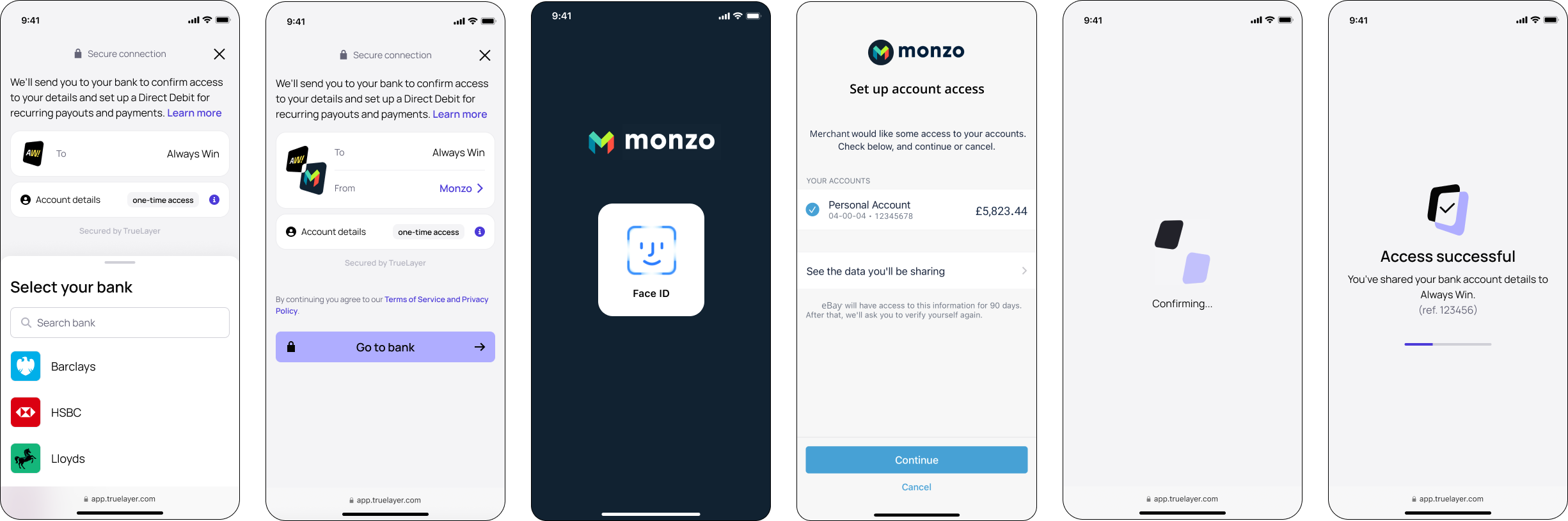
In Console, you can customise the text that displays on these screens so that your user knows exactly how their data will be used. Choose between prewritten UI text specifically for the most common Data use cases, or write your own.
Data errors
Error responses for the Data API include the following fields:
| Field name | Type | Required? | Description |
|---|---|---|---|
type | string | Yes | Information on the cause of the error. This is usually a link to our documentation. |
title | string | Yes | A brief description of the error. |
status | string | Yes | The error code. |
trace_id | string | Yes | An ID that connects your error to our internal logs. |
detail | string | Yes | Some more information on the cause of the error. |
errors | object | No | An object which appears in some errors with more information about any actions you need to take to fix the problem. |
Below is an example error:
{
  "type": "https://docs.truelayer.com/docs/error-types#invalid-parameters",
  "title": "Invalid Parameters",
  "status": 400,
  "trace_id": "96ce50247f87f540bb2d86771b3728b8",
  "detail": "The request body was invalid.",
  "errors": {
    "Connection-Id": [
      "Must be provided"
    ]
  }
}
Data access timeframe
When you create a connection, use the data_access_type field to determine how long access to the end user's bank data is maintained after the initial authorisation.
one_timeaccess allows you to retrieve your user's data, as defined by your scopes.
How long this access lasts depends on the bank account that you are connecting with.recurringaccess allows you to repeatedly retrieve data throughout the full consent window, even when the user is not actively logged in or present.
Reconfirmation of consent
This endpoint is still in development
If your connection with your user's bank account is on a recurring basis, you can use the reconfirmation of consent endpoint to enable your user to maintain that connection, even after the first 90 days.
If the connection expires or is revoked, you'll need to create a new one by directing the user through the authorisation flow again.
Updated 4 months ago